AnimateCC实现库链接
利用animatecc的自定义模板实现库链接。
打开animate cc,新建一个html5 canvas项目;
画一个圆,转换成影片剪辑;
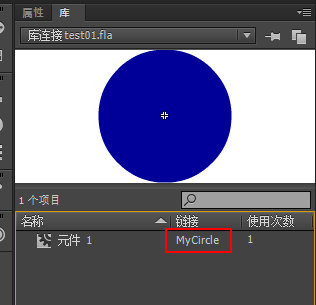
打开库面板,双击链接位置,写入链接名"MyCircle";
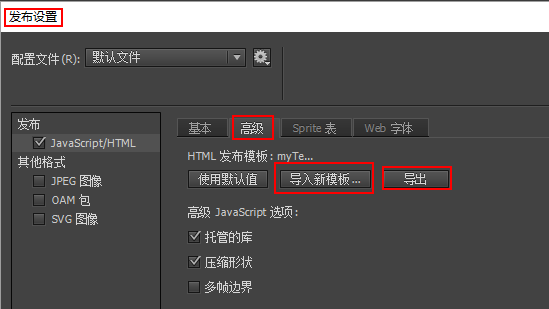
打开发布设置,高级,点击导出,导出html模板;
修改导出的模板;修改后如下:
<!--
	NOTES:
	1. All tokens are represented by '$' sign in the template.
	2. You can write your code only wherever mentioned.
	3. "DO NOT" alter the tokens in the template html as they are required during publishing.
-->

<!DOCTYPE html>
<html>
<head>
<meta charset="UTF-8">
<title>$TITLE</title>
<!-- write your code here -->
<style>
	*{margin: 0;padding: 0;}
	body{background-color: #ffffff;}
</style>

$CREATEJS_SCRIPTS
<script src="MyCircle.js"></script>

$SCRIPT_START
var canvas, stage, exportRoot;
function init() {
	// --- write your JS code here ---
	$CJS_INIT
}
$PLAYSOUND
$SCRIPT_END

<!-- write your code here -->

</head>
<body onload="init();">
	<canvas id="$CANVAS_ID" width="$WT" height="$HT" style="background-color:$BG"></canvas>
</body>
</html>
点击”导入新模板“导入刚才修改过的模板(每次修改模板之后都要重新导入);
在fla同级目录新建一个js文件命名为”MyCircle.js“;js内容如下:
p=lib.MyCircle.prototype;
p.move=function(speed){
	var speed=speed||1;
	var s=this;
	setInterval(function(){
		s.x+=speed;
		if(s.x>550)s.x-=550;
	},30);
}
回到animatecc,将舞台上MyCircle的实例命名为”circle“,选中第一帧,按”F9“打开动作面板,添加代码:
this.circle.move(10)
ctrl+enter;不出意外地话,小球会一直从左到右循环移动。
留言列表:
<script type="text/javascript" src="MyCircle.js"></script>
这是html的基础知识,可以自己百度学习一下。
因为每次发布之后html都会更新,我们每次都需要重新添加一下需要导入的js文件,为了避免这种重复操作,我们可以使用html模板。文章中有介绍。
文章后边有源码,可以下载参考。
欢迎学习交流。