可以用hEngine来画图标,波形等矢量图形。使用引擎,可以让开发者专注于逻辑的实现,而不是纠结于Canvas如何渲染。
效果图:
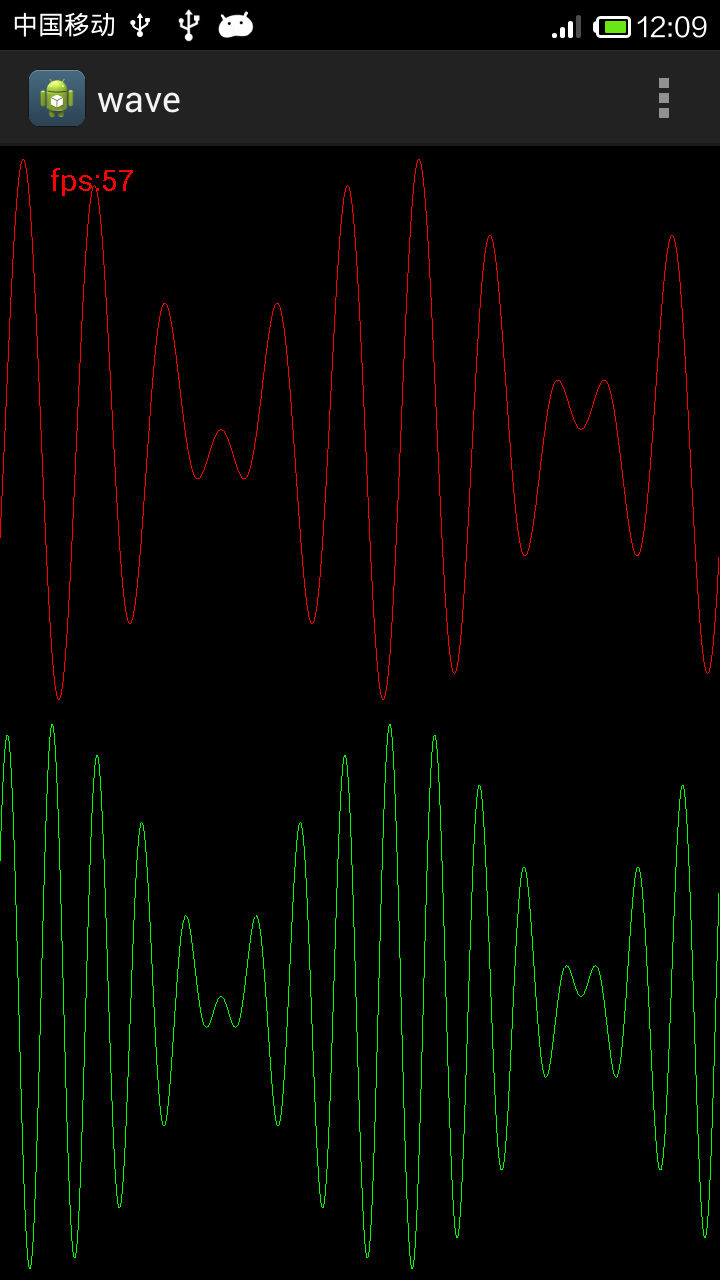
代码:
package com.example.wave;

import com.hanyeah.HEngine;
import com.hanyeah.display.HShape;
import com.hanyeah.display.HStage;
import com.hanyeah.display.HTextField;
import com.hanyeah.events.HEvent;
import com.hanyeah.events.HIListener;

import android.os.Bundle;
import android.app.Activity;
import android.graphics.Color;
import android.graphics.Paint;
import android.graphics.Paint.Style;
import android.graphics.Path;
import android.view.Menu;

public class MainActivity extends Activity {

	private HStage stage;
    @Override
    protected void onCreate(Bundle savedInstanceState) {
        super.onCreate(savedInstanceState);
        setContentView(R.layout.activity_main);

      //初始化引擎和stage
        HEngine hengine=new HEngine(this);
        setContentView(hengine);
        stage=hengine.stage;
        stage.frameRate=60;

        stage.addEventListener(HEvent.STAGE_CREATED, new HIListener() {

			@Override
			public boolean execute(HEvent arg0) {
				// TODO Auto-generated method stub
				init();
				return false;
			}
		});
    }
    private double stageHeight;
    private double stageWidth;
    private HShape shape01;
    private HShape shape02;
    private HTextField fpsTf;
    private long t=0;
    private void init() {
		// TODO Auto-generated method stub
		stageHeight=stage.getStageHeight();
		stageWidth=stage.getStageWidth();
		shape01=new HShape();
		shape02=new HShape();
		stage.addChild(shape01);
		shape01.y=stageHeight*1/4;
		stage.addChild(shape02);
		shape02.y=stageHeight*3/4;

		fpsTf=new HTextField();
        fpsTf.x=50;
        fpsTf.y=0;
        fpsTf.width=300;
        fpsTf.height=50;
        fpsTf.color=Color.RED;
        fpsTf.size=30;
        fpsTf.lineHeight=45;
        //fpsTf.text="fps:"+30;
        stage.addChild(fpsTf);

		stage.addEventListener(HEvent.ENTER_FRAME, new HIListener() {

			@Override
			public boolean execute(HEvent arg0) {
				// TODO Auto-generated method stub
				enterFameHandler();
				return false;
			}
		});
	}
    private void enterFameHandler() {
		// TODO Auto-generated method stub
		t++;
		float h=(float)stageHeight/4-10;
		Path path01=new Path();
		Paint paint01=new Paint();
		paint01.setColor(0xffff0000);
		paint01.setStyle(Style.STROKE);
		for(int i=0;i<stageWidth;i++){
			double angle=(i+t)*Math.PI/360;
			float y=h*(float)(Math.sin(angle)*Math.sin(angle*10));
			if(i==0){
				path01.moveTo(i, y);
			}
			else{
				path01.lineTo(i, y);
			}
		}


		Path path02=new Path();
		Paint paint02=new Paint();
		paint02.setColor(0xff00ff00);
		paint02.setStyle(Style.STROKE);
		for(int i=0;i<stageWidth;i++){
			double angle=(i+t)*Math.PI/360;
			float y=h*(float)(Math.sin(angle)*Math.sin(angle*16));
			if(i==0){
				path02.moveTo(i, y);
			}
			else{
				path02.lineTo(i, y);
			}
		}


		fpsTf.text="fps:"+stage.getFPS();
	}

    @Override
    public boolean onCreateOptionsMenu(Menu menu) {
        // Inflate the menu; this adds items to the action bar if it is present.
        getMenuInflater().inflate(R.menu.main, menu);
        return true;
    }

}
每个波形创建一个HShape对象,侦听HEvent.ENTER_FRAME事件,每帧刷新HShape对象。
发表评论:
◎欢迎参与讨论,请在这里发表您的看法、交流您的观点。